01 / FOUR REGIONS, FOUR CHORDS
Gesture Synth chords with Root C
To play Gesture Synth chords, start an input mode, select Easy Jam and set Root C. The playing area is split into four equal horizontal regions: C, G, Am and F. Hold your mouse or touch pointer, or pinch your thumb and index finger, to sound the chord. Release to stop.
This Root C recipe is for gesture-synth.com. One held position sounds the selected triad’s three notes together. Learn the regions, then complete four bars in Beat Jam. The beginner tutorial covers input setup and first sound.
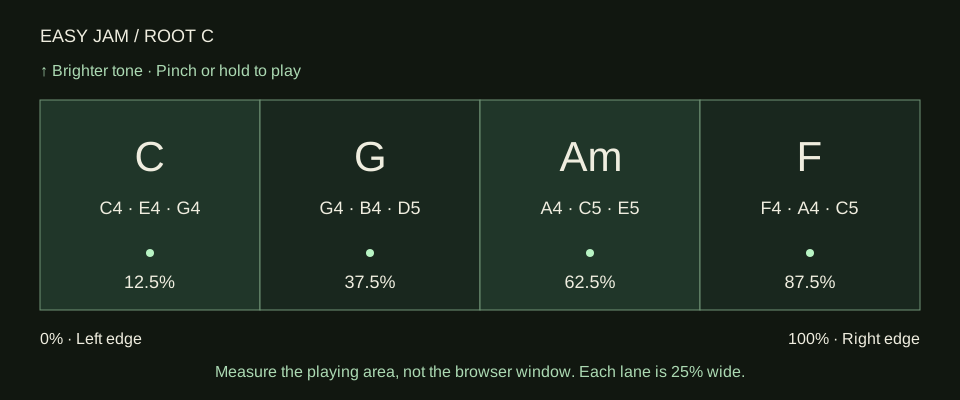
On a small screen, scroll the chord table sideways.
| Chord | Horizontal region | Aim for its centre | Triad notes |
|---|---|---|---|
| C major | Left quarter, 0–25% | 12.5% | C4 · E4 · G4 |
| G major | Second quarter, 25–50% | 37.5% | G4 · B4 · D5 |
| A minor (Am) | Third quarter, 50–75% | 62.5% | A4 · C5 · E5 |
| F major | Right quarter, 75–100% | 87.5% | F4 · A4 · C5 |
A triad contains three notes. C major and A minor share notes, but their combinations sound different. Hold C, release, then hold Am at the same height.
Root can be C, D, E, F, G or A. Changing it transposes the chord set; return to C when following these names and positions. Scale chooses Melody notes. Setting Scale to Minor does not turn Easy Jam’s whole set into minor chords. The Am in this recipe is already a minor triad.
02 / FIND → HOLD → RELEASE
Practise Easy Jam chords without a clock
Easy Jam lets you explore without a timed run. Use Mouse Mode or touch if a steady pointer helps; switch to camera gestures when the regions feel familiar. Keep your hand visible and pinch clearly to play.
Exercise one: find all four centres quietly
Start with Root C and Easy Jam. Without holding or pinching, move to roughly 12.5% of the playing area and check the displayed chord. Hold briefly to hear C, then release. Repeat at 37.5% for G, 62.5% for Am and 87.5% for F. Do two rounds, moving silently between each chord. This separates choosing a position from deciding when sound begins.
Next, repeat C → G → Am → F while keeping your vertical position near the middle. Moving upward makes the tone brighter; moving downward makes it warmer. Vertical movement does not control loudness. Use the separate Volume control when the sound is too quiet or loud. A stable height makes your timing and chord changes easier to hear.
Exercise two: give each chord four counts
Count “one, two, three, four” slowly while holding C. Release, move to G and repeat. Continue through Am and F. Make each chord last the same number of counts, with a small deliberate release between them. If you accidentally cross an edge while holding, release and return to the region’s centre. Speed comes after clean changes.
Moving while holding can play intermediate chords. For this exercise, use a clear release, a quiet move and a fresh hold. Finish when all four names and sounds are predictable.
03 / A COMPLETE TWELVE-SECOND PASSAGE
Make a C–G–Am–F Beat Jam loop
Beat Jam runs at 80 BPM in 4/4: four beats per bar, four bars per run. A four-beat count-in lasts about three seconds; the sixteen-beat performance lasts about twelve seconds. Play one chord per bar.
Prepare the same four positions
Keep Root C, select Beat Jam and check that you can reach C, G, Am and F. Choose a comfortable Volume and keep a steady vertical position. Start the input mode before the timed run so you are ready to play.
Listen through the count-in
Choose Start Beat Jam. Use its four-beat count-in to settle your pointer or hand near the C centre. Wait for the first performance bar; the count-in prepares your timing and is separate from the four-bar passage.
Play one chord per bar
Hold or pinch C for beats 1–4, G for beats 5–8, Am for beats 9–12 and F for beats 13–16. Release and move at each change. Read the current bar and chord target, but also check the chord you are actually selecting. A highlighted target does not play the chord for you.
Hear the take repeat
After the four bars finish, choose Loop this take. Listen for the chord order, timing and any empty beats. At least one actual played chord is needed for a saved loop. The saved performance keeps your chosen chords and gaps, rather than replacing them with a perfect version of the guide.
Keep the result you want
Choose Stop loop to return to saved-loop controls. Use Play loop to listen again, Record loop for a local performance video or Download MIDI for editable notes. Save your result before Replace take, refreshing or closing the tab. The loop remains only in this tab.
These sixteen beats follow the separate count-in. The guide is your target; the saved loop shows what you played. A gap can be an intentional rest or a timing problem to practise next time.
04 / COMPARE YOUR CHANGES
Hear a real four-bar example
This real Mouse Mode example follows the same recipe. Listen for changes after four beats and the return from F to C on replay. It demonstrates the exercise, without automatic full-song playback.
Download the example MIDI if you want to inspect its chords, bass and drums in a music app. Its instruments may sound different there. This file is the example, not your own take. Use the instrument’s Download MIDI control for your performance; the recording and saving guide explains the choice between video, a tab-only loop and MIDI.
Once you can finish the four bars, try another compatible phrase from the songs practice page. Easy Jam offers this chord set rather than a full chord library, multitrack arrangement or complete songbook. Check a song’s required chords before treating this exercise as its accompaniment.
05 / CHANGE ONE THING AT A TIME
Fix the chord or timing you hear
- You hear single notes: check that Easy Jam or Beat Jam is selected rather than Melody. Keep Root C for this exercise.
- The chord names differ: return Root to C. Transposing changes the names, even when your horizontal positions stay similar.
- Chords jump near an edge: aim at the quarter’s centre and keep your hand steady. Release while crossing into the next region.
- Moving makes no sound: hold the pointer or pinch clearly. Movement chooses a chord; the hold or pinch starts it.
- The loop has empty beats: practise one chord for four counts, then repeat the timed run. The target highlight does not fill unplayed beats.
For camera trouble, test the same exercise in Mouse Mode to separate tracking from timing. For file or sharing trouble after a good performance, keep the take and follow the save recovery actions. Camera and performance recording are local; the privacy page covers the wider site.
06 / BEFORE YOUR NEXT TAKE
Frequently asked questions
How do I play Gesture Synth chords?
Start an input mode, select Easy Jam and set Root C. The four equal horizontal regions play C, G, Am and F. Hold the mouse or touch pointer, or pinch your thumb and index finger, to sound the selected chord. Release to stop; moving alone selects without playing.
Do I need three fingers to play a three-note chord?
No. A single hold or thumb-and-index pinch sounds the whole selected triad. This instrument does not use raised-finger counts or wrist turns to choose chords. Those instructions may belong to a different website with a similar name.
Does changing Scale to Minor make Easy Jam use minor chords?
No. Scale selects the note set for Melody. For the recipe on this page, keep Root C and use Easy Jam or Beat Jam. Changing Root transposes the four-chord set, so the displayed chord names will no longer match the C, G, Am and F exercise.
Does moving my hand upward make the chords louder?
Vertical position changes tone brightness: higher is brighter and lower is warmer. It is not the volume control. Adjust the separate Volume control for loudness, and keep a steady height when you want to compare the chords without changing their tone.
Why does my saved loop contain a wrong chord or silence?
Beat Jam saves the chords you actually played, including gaps. The highlighted target is guidance, not automatic correction. Hold or pinch during each intended beat, aim near the centre of its region and listen back. Download a take you want to keep before replacing it.
Can I play all the chords from Creep?
The Root C set here is C, G, Am and F. The familiar G, B, C and Cm progression is not fully available in this exercise, so it cannot reproduce that complete arrangement. Use the four-chord practice here or choose a compatible phrase from the songs page.