01 / RECOGNITION AND PERFORMANCE
Does Gesture Synth use AI?
Yes. Gesture Synth uses AI hand tracking to recognize the position of your hands in camera images. Those positions become controls for a browser instrument: when a note starts, which note plays and how bright it sounds. You make the musical choices through your movements. The AI does not write a song, choose a melody for you or generate a finished track from a text prompt.
This distinction helps explain what you hear. A moving hand is an input, like a finger on a key. Recognition estimates where that input is. Musical rules then decide how the position relates to the selected mode, Root and Scale. Finally, the browser creates the sound. A successful hand detection can still produce silence if you have not made the gesture that starts a note.
If you are asking “is Gesture Synth AI?”, the useful answer is that its camera control uses AI-assisted vision. Its music remains a performance you control. The playing guide covers the practical controls; this page explains why those controls behave as they do.
02 / IMAGE → POSITION → CONTROL → SOUND
How does Gesture Synth work?
Start with a camera view containing a visible hand. Hand tracking looks for landmarks: positions associated with parts of the hand, such as fingertips and joints. Gesture Synth uses MediaPipe for this recognition. The result is position information that the instrument can interpret, rather than an audio recording or a judgment about your musical ability.
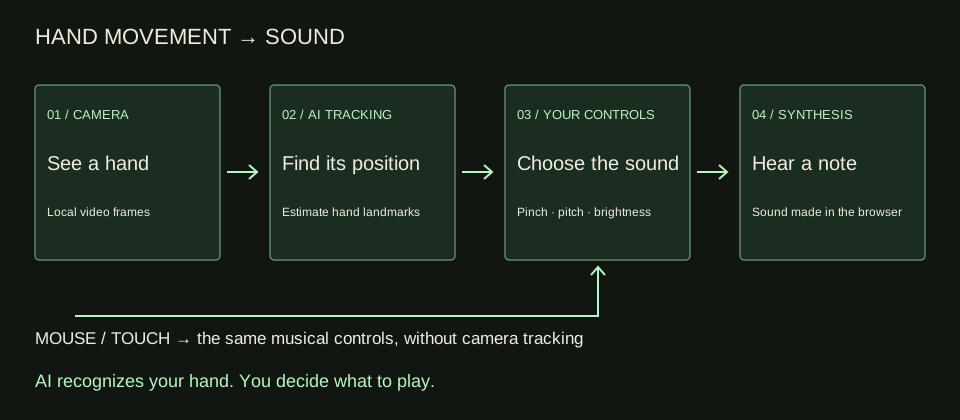
The next step is musical mapping. In Melody, bringing your thumb and index finger together starts a note. Moving horizontally selects a note within the chosen scale. Moving vertically changes the tone's brightness. These are separate jobs: the pinch controls whether you play, the horizontal position chooses pitch, and the vertical position shapes the sound.
Web Audio then synthesizes that sound in your browser and sends it to your chosen audio output. You do not need to sing, speak or supply a microphone recording. Your speakers or headphones reproduce the instrument. Device volume remains a separate listening control, so begin at a comfortable level before experimenting with brighter tones.
For background on the recognition step, Google's Hand Landmarker reference describes hand landmarks as model output. That reference explains the concept; you do not need to install its Python tools to play this website.
03 / THREE CONTROLS YOU CAN HEAR
What each movement changes
Think of the Melody controls as three questions: should a note sound, which pitch should it have, and what character should it have? Keeping those questions separate makes the instrument easier to understand. Moving up is not a volume gesture, and holding a position without pinching is not the same as playing a sustained note.
Scroll this table sideways on a small screen. Keyboard users can focus the table region and use the arrow keys.
| Your action | What changes | Listen for |
|---|---|---|
| Pinch and hold | Note gate: start and sustain a note | A sound begins; separating the fingers ends it |
| Move left or right | Discrete pitch within the selected scale | Lower or higher notes, in steps |
| Move up or down | Tone brightness | A change in sound character, rather than a volume control |
Horizontal pitch is discrete. You move between notes chosen by the scale, rather than sweeping through every possible pitch like a continuous theremin. The scale gives your exploration a musical set to work with. If a broad movement produces several changing notes, slow down and settle in one position before moving again.
Root and Scale explain why the same position can sound different later. Keep your hand still and change Root: the musical starting point changes. Change Scale in Melody: the available note pattern changes. The tracker is still recognizing your hand; your musical settings change what that position means. This is a useful way to separate recognition from the musical rules.
With two hands in Melody, each has its own voice and follows the same mapping. You can make harmonies without assigning a chord role to one hand and a melody role to the other. Easy Jam is a different mode: with Root C, its chord choices are C, G, Am and F. Scale applies to Melody; it does not replace Easy Jam's chord set. Use the chord guide when you want a structured progression.
04 / SAME INSTRUMENT, DIFFERENT INPUT
Hear a performance without hand tracking
This real example uses Mouse Mode, so it demonstrates the instrument's musical output without depending on camera recognition. It plays C → G → Am → F with Root C, one chord per bar in Beat Jam at 80 BPM. The four-bar clip lasts about twelve seconds. You are hearing a performed loop, not an AI-generated composition.
For your own comparison, play a held Melody note with mouse or touch, then move horizontally and vertically separately. If those controls make sense, camera mode adds hand recognition to a relationship you already understand. If tracking becomes uncertain, return to the no-camera input to keep practising the musical part.
05 / CHOOSE YOUR INPUT
Camera processing and the no-camera path
Camera hand processing happens locally on your device. The hand model is downloaded from the site, and camera frames are not uploaded for hand recognition. Camera mode requires your browser's camera permission. Keep the device stable, provide light and leave enough space for the hand to stay fully visible.
Mouse and touch playing do not need AI hand tracking or camera permission. They provide position and hold information directly from your pointer. On a phone, start with touch if you want to explore the sound before arranging a camera view. The mobile guide explains that path and the limits of current device verification.
Local camera processing does not mean every part of the website works offline or that the site has no analytics. Keep those questions separate from hand recognition. The privacy page explains the site's wider data practices. No microphone is needed for playing or for recording the synth sound.
06 / SET THE RIGHT EXPECTATION
Play music, then choose what to keep
Gesture Synth is a browser instrument. It does not transform your voice into a vocoder performance, connect live MIDI to a DAW or keep a cloud music project. Its value is the immediate relationship between movement and sound. Try a short phrase from the songs practice page once you can start and stop notes deliberately.
A performance video and a saved Beat Jam loop serve different purposes. Record up to fifteen seconds for a clip with synth audio; download it to keep a file. A saved Beat Jam loop stays in the current tab and can provide a MIDI file export. MIDI contains editable musical notes, not the video or exact sound. Follow the recording guide for saving and sharing.
QUESTIONS / CLEAR ANSWERS
Frequently asked questions
Does Gesture Synth use AI to compose music?
No. Camera mode uses AI to recognize hand positions. Your gestures and selected musical settings control the notes and tone, and the browser synthesizes the sound. You are playing an instrument, not asking a generative model to write a finished song.
How does MediaPipe recognize my hand?
A hand-tracking model estimates landmarks such as fingertip and joint positions from camera images. Gesture Synth interprets those positions as musical controls. Keep your hand visible and well lit; recognition quality can vary with the camera view and device.
Why can I see my hand but hear no note?
In Melody, hand position alone is not enough: pinch your thumb and index finger together to start a note, then separate them to stop. Check audio volume too. Use the playing guide to test one deliberate note.
Why does pitch change in steps rather than continuously?
Melody chooses discrete notes from your selected scale. Horizontal movement moves through that set; vertical movement changes brightness. This is a scale-based instrument rather than a continuous theremin. Root and Scale can change what the same position sounds like.
Does it upload camera video or require a microphone?
Camera frames are processed locally for hand recognition, with the model downloaded from the site. No microphone is required. Local tracking is separate from wider site analytics and data practices; read the privacy page for those details.
Can I play without AI hand tracking?
Yes. Mouse and touch controls provide hold and position input without camera permission or AI hand tracking. Start with the no-camera path to learn the musical controls, then try camera mode if you want to play with your hands in the air.